SpectraSentry · feature guide
EMF-390 Tactical HUD
Full multi-sensor polling of the GQ EMF-390 v2 — EMF, Electric Field and 3-axis gyro — with severity-coded gauges and real serial readings.
What it does
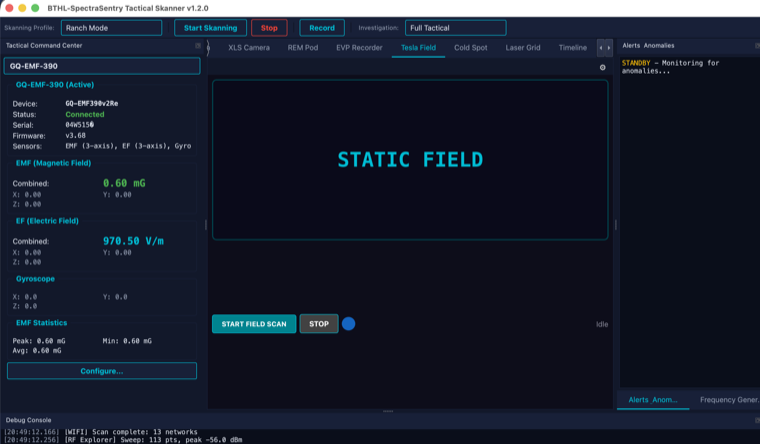
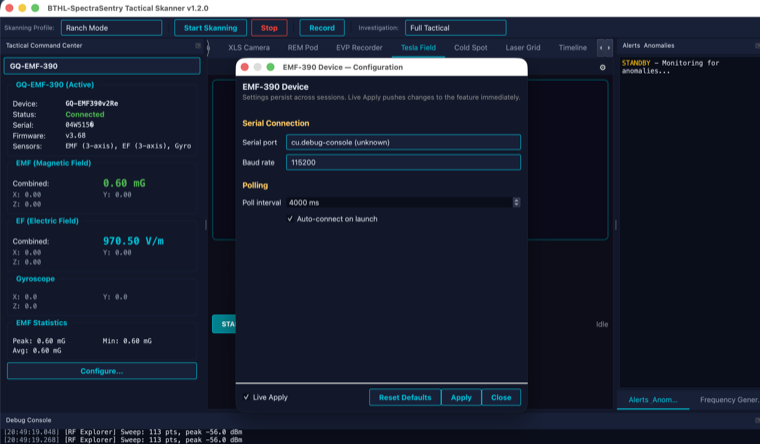
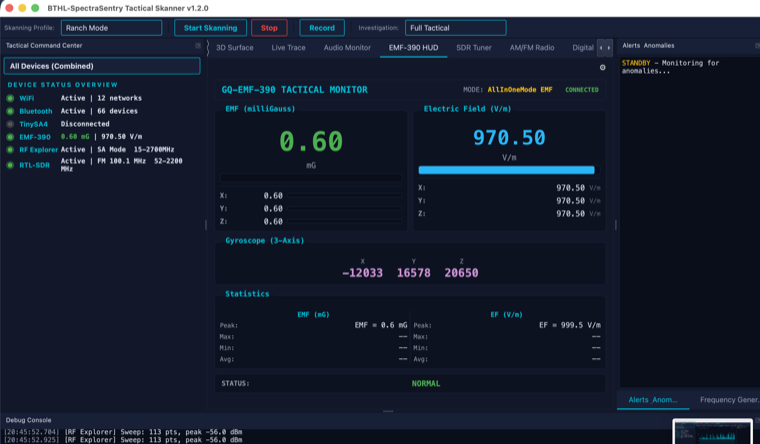
The EMF-390 HUD connects to the GQ EMF-390 v2 over USB serial and polls every sensor the device exposes: EMF (combined plus X/Y/Z), Electric Field (combined plus X/Y/Z), 3-axis gyroscope, and the current mode. Readings are the device’s real responses, displayed on large severity-coded gauges with running statistics. A device detail panel shows firmware and serial, and a live configuration dialog tunes the serial port, baud and poll interval. When the meter is unplugged the HUD reads “DISCONNECTED” — values are never synthesized.
What it is for
- EMF surveys and baselining a location’s ambient electromagnetic field.
- Paranormal investigation — watching for sudden EMF/EF spikes.
- Feeding real EMF/EF into the Ovilus, REM-POD and Cold-Spot tools.
- TSCM — spotting unexpected field sources near walls and fixtures.
How to use it
Step by step
- Connect the EMF-390Plug the GQ EMF-390 v2 into USB (CH340 serial). The HUD auto-detects and starts polling.
- Read the gaugesEMF (mG) and EF (V/m) show combined plus per-axis X/Y/Z; gyro shows orientation. Colors flag severity.
- Tune pollingOpen the configuration dialog to set serial port, baud, poll interval and auto-connect (Live Apply).
- Use across toolsIts real EMF/EF feed drives the Ovilus word generator and the REM-POD / Cold-Spot detectors.
Specifications
The details
| Sensors | EMF (combined + X/Y/Z) · Electric Field (combined + X/Y/Z) · 3-axis gyro · mode |
| Connection | USB serial, CH340, 115200 baud |
| Display | Severity-coded gauges · running statistics · device detail panel |
| Data | Real device serial responses only — “DISCONNECTED” when unplugged |
Screenshots
In action