SpectraSentry · feature guide
SDR Radio
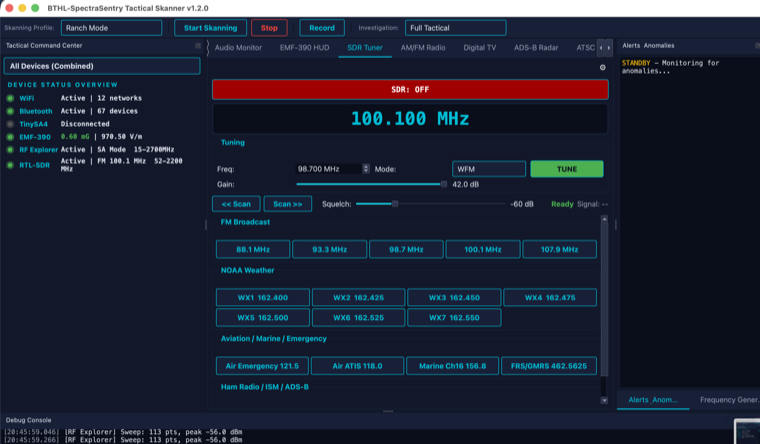
A vintage-dial AM/FM receiver driven by the RTL-SDR, with 20 presets, an FM auto-seek scanner, squelch, and a real power toggle.
What it does
The SDR Radio tab is a software-defined receiver with a Sangean-style tuning dial. It demodulates FM (wide and narrow) and AM from the RTL-SDR’s IQ stream, with 50µs de-emphasis and soft clipping for clean audio. Twenty presets cover NOAA weather, aviation, marine, ham, ISM and ADS-B. A live signal meter reads real IQ power. Streaming never starts on its own — you control it with the power ON/OFF toggle.
What it is for
- Monitoring NOAA weather radio (7 presets) during field investigations.
- Listening to aviation, marine, ham, and ISM activity in the area.
- Quickly scanning the FM band for active stations with auto-seek.
- Confirming a receiver/antenna chain is working with a known broadcast signal.
How to use it
Step by step
- Connect the RTL-SDRPlug in the Nooelec NESDR. The radio claims it when you power on.
- Power ONPress the power toggle — the SDR begins streaming (it never auto-starts).
- TuneSpin the dial, type a frequency, or pick a preset bank (NOAA / aviation / marine / ham / ISM).
- Set squelch & modeChoose WFM/NFM/AM and raise squelch to mute noise between signals.
- Auto-seekStart the FM scanner to step to the next station above the squelch threshold.
Specifications
The details
| Demodulation | Wideband FM, Narrowband FM, AM · 50µs de-emphasis · soft clipping |
| Presets | 20 total — 7 NOAA weather, aviation, marine, ham, ISM, ADS-B |
| Tuner | RTL-SDR E4000, 52–2200 MHz (L-band gap ~1100–1250 MHz) |
| Controls | Power ON/OFF · squelch · FM auto-seek scanner · signal meter (real IQ power) |